Windows SQL Server containers with writable database clones
Microsoft’s adoption of Docker containers is a boon for Continuous Integration and DevOps initiatives, with .NET and Java application environments provisioned in seconds. But, incorporating SQL Server environments with large databases continues to be a challenge. SQL Server containers are provisioned on demand, but data environments can require hours to replicate or restore. Windocks has pioneered the use of Windows based SQL Server database clones, and is pleased to introduce support for Microsoft’s SQL Server containers, and conventional servers and workstations.
SQL Server clones utilize Hyper-V based Virtual Hard Drives (VHDs) and run wherever Windows Servers are supported, including public clouds or on premise infrastructure. Terabyte class environments are delivered in seconds with full read/write support, and are ideal for development, test, and reporting and BI.
Microsoft’s SQL containers combined with SQL Server database clones delivers a powerful set of benefits:
- Existing Jenkins, TeamCity, and Visual Studio users can easily incorporate SQL Server workloads. The integrated workflow improves developer productivity, test coverage, and results in higher quality releases.
- Docker containers and images are portable, improving team productivity, and simplifying cloud migration strategies. An image that runs on a developer’s machine can be shared with a test team, without DLL dependencies or configuration issues hindering usage.
- Data images include privacy and security enhancing Data Governance and Regulatory Compliance, with secure data distribution within the enterprise.
- Terabyte class data is delivered in seconds, and requires less than 40 MB of storage.
- Affordability: this is a Windows based alternative built for SQL Server DBAs, with dramatically lower prices and cost of ownership than UNIX storage appliances.
- Teams simplify operations with containers on a shared host, reducing use of VMs by 5X or more.
SQL Server Database Cloning
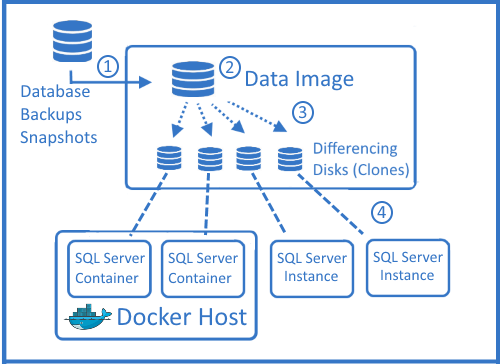
SQL Server clones are based on Windows Virtual Hard Drives (VHDs), with “Differencing disks” providing writable cloned databases. The parent VHD is a full byte copy of the data, and can support a single database or scores of databases in each clone. Scripts are run during the parent VHD build, creating an immutable artifact that incorporates user permissions, data masking, and other preparations for regulatory and policy compliance.
The workflow begins with full and differential backups delivered to a Windows file share (step 1 below). Windocks builds the clone image by restoring the backups and applying SQL scripts as defined by a Dockerfile (step 2). Once the image is built, clones are created on demand for users (Step 3), and delivered to SQL Server containers and other instances (Step 4).
SQL Server images are defined with a Dockerfile that can include scores of backup files with a SETUPCLONING command as illustrated below. SQL Server scripts are applied during the image build, to address user permissions, encryption, and data masking.

Need clarification?
What is T2D3?
Lorem ipsum dolor sit amet, consectetur adipiscing elit, sed do eiusmod tempor incididunt ut labore et dolore magna aliqua. Ut enim ad minim veniam, quis nostrud exercitation ullamco laboris nisi ut aliquip ex ea commodo consequat. Duis aute irure dolor in reprehenderit in voluptate velit esse cillum dolore eu fugiat nulla pariatur.
Can I use T2D3 on my phone?
Lorem ipsum dolor sit amet, consectetur adipiscing elit, sed do eiusmod tempor incididunt ut labore et dolore magna aliqua. Ut enim ad minim veniam, quis nostrud exercitation ullamco laboris nisi ut aliquip ex ea commodo consequat. Duis aute irure dolor in reprehenderit in voluptate velit esse cillum dolore eu fugiat nulla pariatur.
Can I change my plan later?
Lorem ipsum dolor sit amet, consectetur adipiscing elit, sed do eiusmod tempor incididunt ut labore et dolore magna aliqua. Ut enim ad minim veniam, quis nostrud exercitation ullamco laboris nisi ut aliquip ex ea commodo consequat. Duis aute irure dolor in reprehenderit in voluptate velit esse cillum dolore eu fugiat nulla pariatur.
What is so great about the Pro plan?
Lorem ipsum dolor sit amet, consectetur adipiscing elit, sed do eiusmod tempor incididunt ut labore et dolore magna aliqua. Ut enim ad minim veniam, quis nostrud exercitation ullamco laboris nisi ut aliquip ex ea commodo consequat. Duis aute irure dolor in reprehenderit in voluptate velit esse cillum dolore eu fugiat nulla pariatur.
Get notified on new test data management insights
Be the first to know about new insights on DevOps and automation in the test data management space.